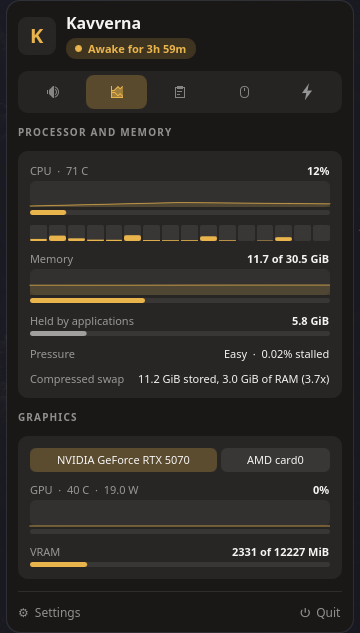
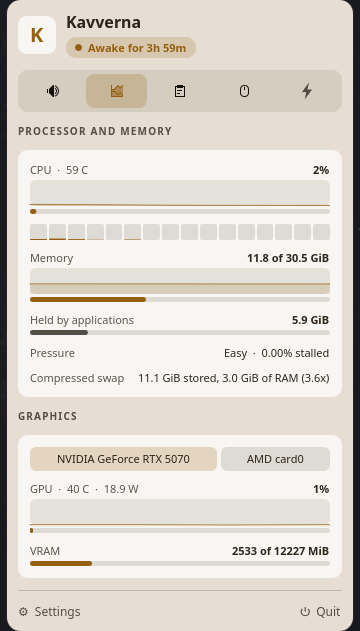
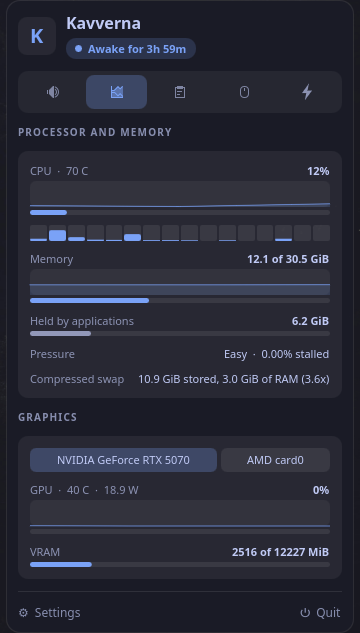
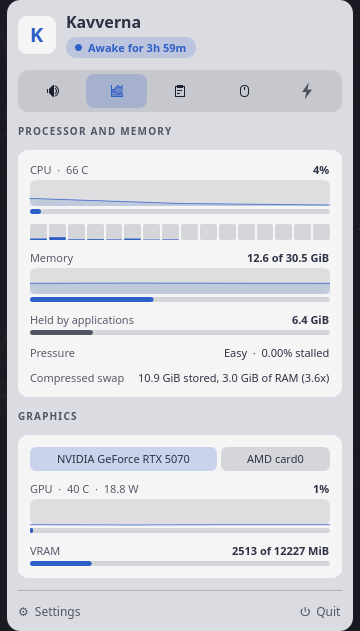
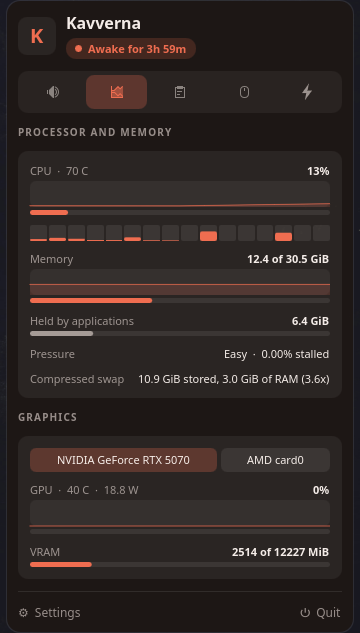
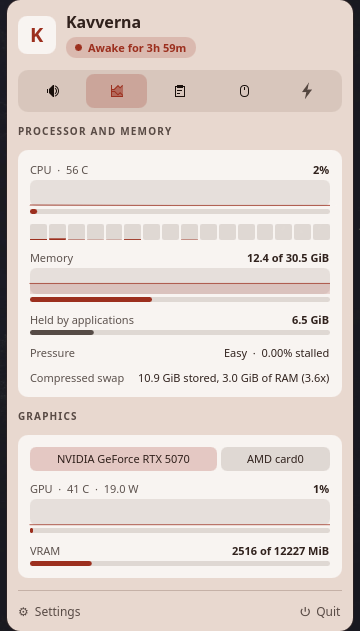
The same page in every light the cavern has: Torch, Tide and Ember, each
dark and light, following the desktop or pinned to either.
Why this exists
I use Vorssaint every day on
my Mac. It puts a per-application mixer, a system monitor, clipboard history and keep awake
behind one menu bar icon. Moving to Linux on my desktop, I could not find anything covering
the same ground. Plasma ships pieces of it, spread across separate applets, and none of them
go as far.
Kavverna is the missing tool, written from scratch in Rust with its interface in Qt and
QML. It is not a port: no line of the original was copied, and several things here work
better because Linux allows what macOS does not.
Everything it does
The suite itself
Every utility has its own switch, grouped as the panel groups them. One
switched off disappears from the panel and from the settings, and stops running: its thread
never starts. Turning it back on restores what it was configured to do.
Three themes, each designed whole. Torch is the cavern it has always
been; Tide floods it in blue-slate; Ember burns it down in red. Light and dark variants in
all three, measured against WCAG AA, applied the moment one is picked.
The panel opens where it is useful. Beside the tray icon by default,
wherever your bar lives; or wherever you last dragged it, one spot per screen; or the old
corner. Drag it by its header and an outline shows where it will land.
A tray menu that reaches the whole suite, not just keep awake: mute
every microphone, move to the next output, open the history, open the shelf.
A shortcut for every utility worth reaching blind: the panel, the
clipboard, the shelf, keep awake, mute every microphone, the next output. Registered
through the desktop, so System Settings lists them beside every other shortcut.
Settings are an index, not a scroll. Ten groups, closed, each saying
in a line what it holds, and one open at a time.
Each utility says what it costs: nothing at rest, reads on a timer,
watches the clipboard. The label sits beside the switch.
Sound
Volume per application. One row per application rather than per stream,
because a single application can hold several and PipeWire gives them nothing to tell apart.
The row shows its loudest stream and a change reaches all of them. The percentage beside a
slider can be typed: click it, type the figure, Enter.
Every output and input with live volumes, mute, and switching which one
is the default. Device volume is written on the card's route, so the slider moves what you
hear.
Send each application to its own output. Music to the speakers, the
game to the headset. The choice is remembered by application, survives the device
unplugging, and comes back when it returns. A stream that refuses to move says so on its
row instead of hiding.
The same for microphones: applications recording are listed with the
source each one reads from, and each can be pointed at its own.
Mute every microphone in one click, or from a shortcut.
Come back to a preferred microphone: pin one and it is made the default
again whenever it is plugged back in.
Step through the outputs you choose from a shortcut or the tray.
The shelf
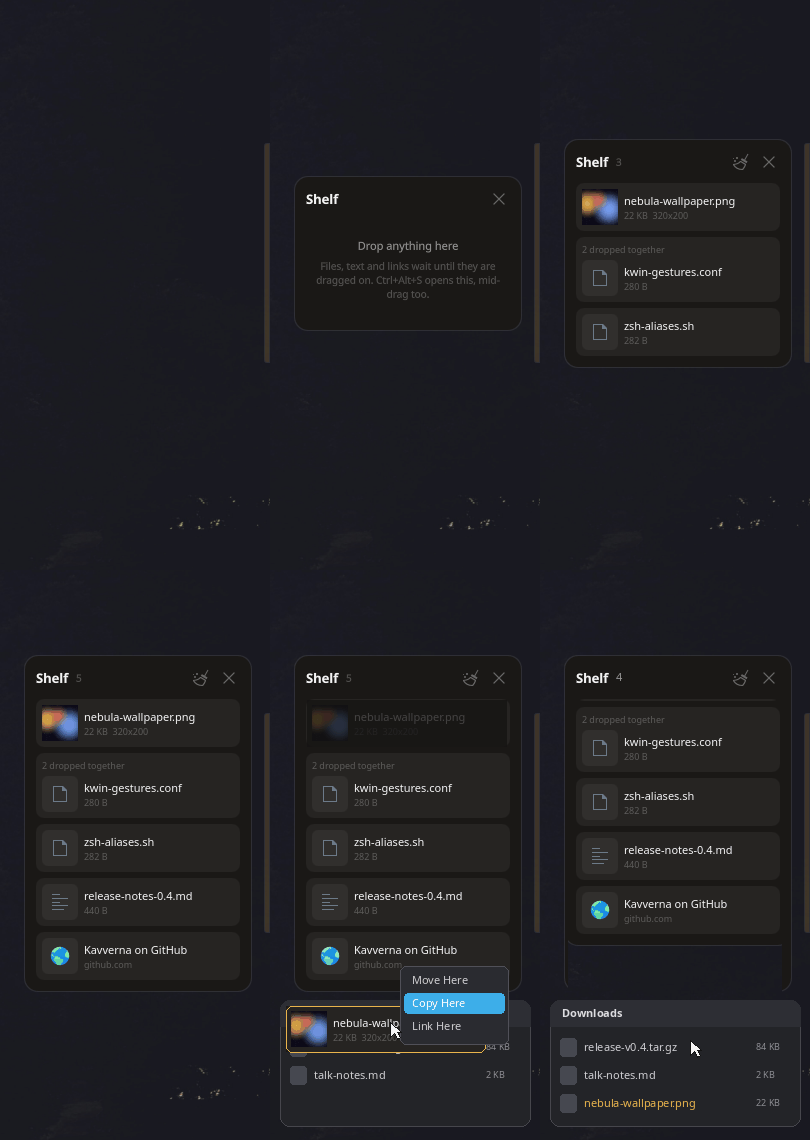
A place to put things down mid-task. Drop files, text or links onto it
and they wait until dragged somewhere else. Several things dropped together stay together
as one pile.
Dropping stages, never copies. A local file is held by its path; only
content with no file behind it is written into the shelf's own directory. A web address
stays a link and is never fetched.
Reachable mid-drag. A thin strip on the right screen edge opens the
shelf the moment a drag touches it, and Ctrl+Alt+S works even with a file in hand.
It lives where you put it. Drag it by its header and it reopens there; pick which edge the strip hangs from until then.
A closer look on hover. A row opens underneath itself: an image at a
readable size, the first thousand characters of a dropped text, a link or a path in full,
and a file that has gone from disk says so.
It survives restarts behind a setting, and an item dragged to a
destination that accepted it leaves the shelf on its own.
The shelf is young, and the idea is already whole: put something down,
keep working, pick it up where it is needed.
Monitoring
The processor by name, its cores and threads, and the speed of its
fastest core right now.
Processor load overall and a bar per thread, with temperature read from
the chip by name rather than by index, since those move between boots.
The last two minutes behind each reading, drawn as a trace, so the
spike that was over before the panel opened is still there to see.
Memory with the page cache excluded, what applications actually hold,
and pressure from the kernel's own PSI rather than a guess.
Compressed swap priced by what it really costs in RAM.
Both graphics cards, never summed: usage, temperature, power and VRAM,
with the discrete one chosen by default.
Clipboard
History of text, images and files, with search, pinning, manual
ordering and a size limit that pinned entries do not count toward.
Ctrl+Alt+V opens it from anywhere with the search field ready. Arrows
walk the list, Enter or Ctrl+1 to Ctrl+9 put an entry back.
Nothing marked as a secret is ever read. A password manager's copy
carries a mime type that says so, and the content is never taken.
Take over from Plasma. Klipper's saved history can be adopted, keeping
the times it already had.
Empty the clipboard on its own, on a timer, on suspend or on screen
lock, without touching a saved entry.
Take the tracking out of copied links, and leave everything else byte
for byte as it was. Every rule is listed with a switch of its own, and a name of your own
can apply everywhere or to one site.
Turn what was copied into something else: plain text, laid out JSON,
or Markdown made from the copy's own HTML, read at the moment you ask rather than stored.
The result is shown first, the clipboard changes only when you take it, and the original
stays in the history.
Energy and tools
Keep awake for a set time or until switched off, with a live countdown,
and a choice between holding off sleep alone or the displays as well. It talks to the power
daemon, so it is honoured rather than hoped for.
Move the pointer to a random place at a random interval, and press a key
as well or instead, for the idle watchers that only count the keyboard.
Install
On Arch, building it yourself
Installs the binary, the desktop entry and the icon the way anything else on the system
does, and pacman -R kavverna removes it again.
git clone https://github.com/novasvilla/kavverna
cd kavverna/packaging
makepkg -si
This is the route to take on a machine you keep: it links against the Qt 6, PipeWire and
SQLite that machine actually has, so a later system update cannot leave it pointing at a
library that has moved.
On Arch, the package attached to a release
Every release carries a built
package for Arch or CachyOS on x86_64, running Plasma 6 on Wayland with the Qt 6 the system
already has.
That URL always points at the newest release, and pacman takes the version
from inside the package rather than from the file name. Downloaded first rather than handed to
pacman as a URL, because a remote file makes pacman look for a signature beside it
and the package is not signed. The checksum published alongside is what stands in for one:
It resolves the same dependencies the source build does, since both come from the same
PKGBUILD. The trade is that this binary was linked against whatever Arch shipped
on the day of the release rather than against what is on your machine now.
Anywhere else
Building needs a Rust toolchain, clang, pkgconf, and the
development headers for Qt 6 Base, Qt 6 Declarative and PipeWire; running needs
layer-shell-qt and kirigami. Other distributions ship the same
things with a -dev or -devel suffix.
kavverna-shell --selftest prints one line per thing the machine must offer,
so a missing piece names itself instead of failing quietly.
Tested on CachyOS with KDE Plasma 6.7 on Wayland and Qt 6.11. Other distributions are
untested rather than refused: everything KDE specific is reached over D-Bus and QML imports
rather than linked, so widening support means adding backends, not rewriting.
What Wayland does not allow
Worth saying up front, because these limits are not going away.
Which application copied something cannot be known. A selection carries
no client identity. Exclusions work by the mime type a password manager sets instead.
The tray icon cannot show text. The live numbers live in the panel,
one click away.
An ordinary window cannot place itself. Kavverna's surfaces are layer
shell, which places itself by anchors and margins, and on Plasma the tray click carries the
icon's coordinates, so the panel opens beside it and can be dragged anywhere. Without layer
shell, GNOME among others, the compositor decides and the placement setting is inert.
A drag in progress elsewhere is invisible until it crosses one of our
own surfaces, so the shelf cannot appear the moment a drag starts anywhere: the edge strip
and a mid-drag shortcut are the honest versions.
Emptying the clipboard fights Plasma until Klipper's Prevent empty
clipboard option is turned off.
What is next
In roughly this order. Anything here is a good place to start if you want to help.
Network and disk in the monitor.
Quick toggles: dark mode, lock, screens off, night colour, eject
removable disks. Nearly all one call each, and the tools page has room.
Pasting straight from the picker into the application you were in,
which needs synthetic input and is why it is not here yet.
Text snippets, expanded through the input method so they need no
privilege at all.
A scratchpad for notes on their way somewhere else.
Answering in KRunner, so the history is reachable from the launcher
everyone already uses.
A second history for the middle-click selection, which macOS has no
concept of.
A shortcut guide, showing what is bound across the whole session and
where two things collide. KGlobalAccel knows every global shortcut, which is more than the
desktop surfaces anywhere today.
Fan control, last, with its own privileged daemon and a thermal
watchdog.
Deliberately not here, because Plasma already does them well: window management and
tiling, another launcher, screen OCR, day and night theme switching, file manager context
actions, and a panel applet for live readings, since Plasma ships seven system monitor
applets already. The point of this suite is one place for everything.
More tools are welcome
Adding one is smaller than it looks: a descriptor in the feature catalogue, a crate that
knows nothing about Qt, and one file for its section of the panel. The
contributing
guide walks through it.
Buy me a coffee
Kavverna is free and always will be. If it saves you the trouble of hunting down half a
dozen applets, this is the way to say so.